Image

Eli Burris/Ohio University
Ohio University faculty can begin entering required syllabus information for Fall Semester 2026–27 beginning March 30 in Canvas.
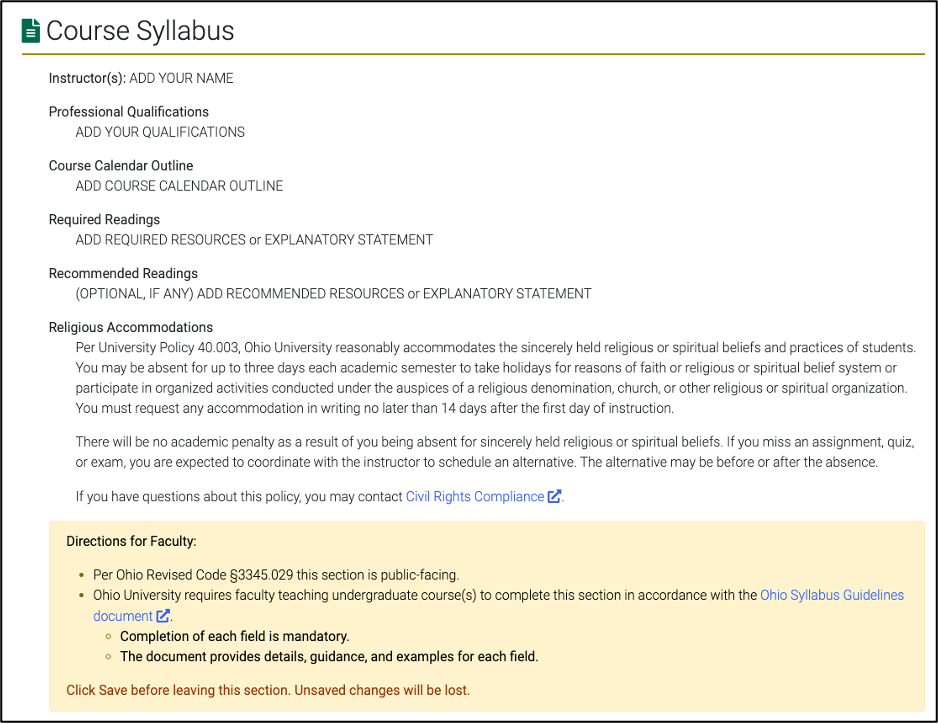
The update supports Ohio University’s implementation of Concourse Syllabus, a tool integrated into Canvas that helps the University meet the requirements of the Advance Ohio Higher Education Act (Ohio Revised Code §3345.029) and to ensure that course syllabus components are publicly available for undergraduate courses.
Instructors of record need to complete only five required elements, and the process is designed to be straightforward within Canvas using the Concourse Course Syllabus tool.

Faculty teaching undergraduate courses are required to complete the Course Syllabus using the Concourse tool within Canvas. This requirement applies to all undergraduate class sections offered regardless of enrollment numbers in Fall Semester 2026–27.
Only five elements are required.
The Course Syllabus includes five elements required by state law:
The course syllabus information entered will be available through a public search beginning Aug. 21, the Friday prior to the start of fall semester.
Canvas is the required platform for entering the Course Syllabus.
First day of class information, including course policies, assignments, and grading details, may be distributed as the faculty normally would through Canvas, handout, email, etc. The Concourse Course Syllabus captures only the five elements required by state law. Concourse does provide additional elements for providing first-day-of-class information to your students that faculty may choose to use, but they are not required.
To support faculty in completing the Course Syllabus, the Office of Instructional Design (OID) is offering several training opportunities and resources.
Faculty can:
Faculty who plan to combine multiple course sections in Canvas should follow the specific steps outlined in the Concourse Syllabus guidance to ensure the Course Syllabus information is entered correctly for each class section.
Instructions for combining sections and completing the Course Syllabus are available on the Concourse Syllabus resource website.
The implementation of Concourse Syllabus was guided by a faculty workgroup that partnered with the Provost’s Office, the Office of Instructional Technology, the Office of Instructional Design and the University Registrar to pilot the system.
Information about the faculty workgroup and the broader public syllabus initiative is available on the Provost’s website.
Is this replacing my full syllabus?
No. The Concourse Course Syllabus captures only the five elements required by Ohio law. Faculty can continue to share their full syllabus (first-day-of-class information) and additional course information through Canvas (or other means) as usual.
Do I have to use Canvas to enter the Course Syllabus?
Yes. Canvas is the required platform for entering the Course Syllabus using the integrated Concourse tool.
What if I combine multiple course sections in Canvas?
Follow the guidance provided on the Concourse Syllabus resource website to ensure the required syllabus information is entered correctly for each class section.
When will the Course Syllabus be publicly available?
The syllabus information entered into Concourse will be available through a public search beginning Aug. 21, the Friday prior to the start of the fall semester.
Faculty are encouraged to review training resources and complete the Course Syllabus early while preparing their fall courses.
Entering the required information this spring or early summer will help ensure syllabus details are ready for the public search available Aug. 21 and reduce last-minute preparation before the start of the fall semester.